KV Cache in LLMs: How It Works and How to Test Inference Performance

Bharat VarshneyAmbassador
Oct 30, 2026
Quick answer
KV cache is an LLM inference optimisation that stores the key and value tensors computed for earlier tokens and reuses them at each new decoding step. It makes generation faster but consumes GPU memory that grows with context length and concurrent requests, so testers should measure time to first token, inter-token latency and memory together.

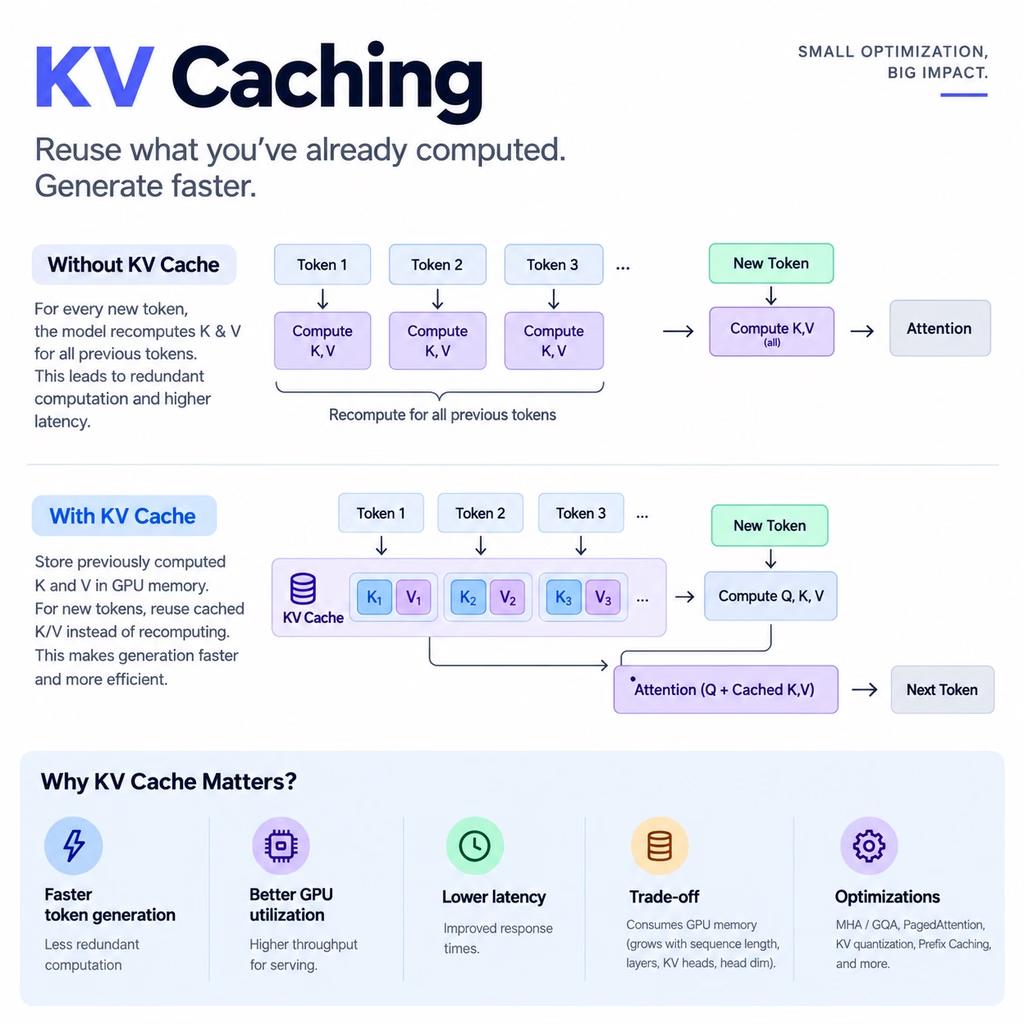
A large part of the reason sits inside the model server, in a structure called the KV cache. It is why a model does not redo the same work for every token it writes, and it is also one of the biggest consumers of GPU memory in production. If you test AI applications, knowing how it behaves tells you which metrics to collect, which workloads to build and where to look when latency climbs.
What you need to know
KV cache (key-value cache) is an inference optimisation in transformer language models. While a model generates text one token at a time, it stores the key and value tensors it has already computed for earlier tokens and reuses them at each new step instead of recalculating them.
- It makes decoding faster, because earlier tokens are not reprocessed at every step.
- It costs GPU memory, and that cost grows with context length and with the number of concurrent requests.
- It does not change what the model knows. Answer quality still depends on the model, the prompt and any retrieved context.
For testers, the cache explains why time to first token, per-token speed and memory use behave differently as prompts get longer and traffic grows.
| Attribute | Answer |
|---|---|
| Full name | Key-value cache |
| Used during | Inference (autoregressive decoding), not ordinary training |
| Main benefit | No recomputation of keys and values for earlier tokens |
| Main cost | GPU memory that grows with tokens and concurrent sequences |
| Key metrics | Time to first token, inter-token latency, throughput, GPU memory |
| Common optimisations | GQA, PagedAttention, prefix caching, cache quantisation |
| Main test risks | Memory pressure under load, missed cache hits, cross-session leaks |
How KV cache works
Query, key and value
Transformer attention uses three learned representations for every token. A library is a useful way to picture them:
- Query (Q): what the current token is looking for.
- Key (K): what each earlier token offers, used to score how relevant it is.
- Value (V): the information each earlier token contributes once it is judged relevant.
In the sentence “The customer opened an account because they needed a safe place to save money”, attention is what lets the model connect “they” to “customer”. The keys and values of earlier tokens are needed at every step of generation, which is exactly why they are worth keeping.
Step by step
- The model processes the whole prompt and builds the initial cache of keys and values for every layer.
- It predicts the first output token.
- The new token produces its own key and value tensors.
- Those tensors are appended to the cache.
- The next token is predicted from the current query and all cached keys and values.
The loop repeats until the response ends or reaches a generation limit. Without the cache, the last step would mean recomputing keys and values for the entire sequence every time. The principle is simple: don’t recompute what you can reuse.
Prefill and decode
Inference has two phases with different performance profiles, and each maps to a different metric.
- Prefill processes the input prompt and builds the cache. It drives time to first token (TTFT), and its cost grows with prompt length.
- Decode generates output tokens one by one using the cache. It drives inter-token latency and is usually limited by memory bandwidth, cache capacity and scheduling.
Suppose a chatbot given a 10,000-token prompt takes two seconds to produce its first token and then streams steadily. That points towards a prefill bottleneck, but it does not prove one: network time, retrieval and request queueing all add to TTFT too. Measure TTFT and inter-token latency separately. A single end-to-end response time hides which phase is slow.
Why KV cache uses so much GPU memory
The cache holds a key tensor and a value tensor for every retained token, in every layer. Its size depends on the number of layers, the number of KV heads, the head dimension, the number of cached tokens, the numeric precision and the number of active sequences. For a standard full-attention model, a simplified estimate is:
KV cache bytes = 2 × layers × batch size × tokens × KV heads × head dimension × bytes per elementThe factor of 2 accounts for keys and values.
A worked example
Take a model with 32 layers, 8 KV heads, a head dimension of 128, 4,096 cached tokens, 16-bit storage (2 bytes per element) and one active sequence:
2 × 32 × 1 × 4,096 × 8 × 128 × 2 = 536,870,912 bytes ≈ 512 MiBSixteen concurrent sequences of the same length need about 8 GiB for the cache alone, before implementation overhead and other allocations. Real figures depend on the architecture and the serving engine: sliding-window attention, block allocation and cache sharing all change the result.
What this means for testing
A model can fit comfortably in GPU memory with one user and still run into memory pressure with fifty. Loading the model and getting one good response proves very little. This matters most for RAG assistants that send long retrieved passages, agents whose history grows with every tool call, and support chatbots with many concurrent users. Under load, monitor:
- GPU memory utilisation.
- Cache utilisation and allocation failures.
- Time to first token and inter-token latency.
- Throughput.
- Timeouts and failed requests.
KV cache optimisations and their trade-offs
Several techniques shrink the cache or manage it more efficiently. They solve different problems, so each needs its own checks.
| Technique | What it does | What to test |
|---|---|---|
| Multi-query attention (MQA) | Shares one key and value head across all query heads | Memory saved against any change in output quality |
| Grouped-query attention (GQA) | Shares KV heads among groups of query heads | Memory and quality compared with a full-attention baseline |
| PagedAttention | Stores the cache in fixed-size blocks instead of one contiguous allocation | Memory utilisation and how many concurrent requests fit |
| KV cache quantisation | Stores cached tensors at lower precision | Memory saved, latency and answer quality on a golden dataset |
| Prefix caching | Reuses the cache for prompts that share an identical prefix | Hit and miss rates, and invalidation when the prefix changes |
| Cache offloading | Moves part of the cache to CPU memory or another tier | Transfer overhead and its effect on latency |
MQA and GQA are architecture choices made when the model is built. PagedAttention is a memory-management technique inside the serving engine. Quantisation and prefix caching are serving options you can usually switch on and off, which makes them the most common subjects of before-and-after tests.
These are easy to confuse with other optimisations. Quantising model weights does not automatically quantise the KV cache, and batching can raise overall throughput while making individual requests slower. Choose the optimisation that matches the bottleneck you have measured, not the one that sounds most effective.
How to test KV cache performance
This plan works against a local inference server or a production-like test environment. Change one variable at a time so you can attribute what you see.
1. Establish a baseline
Run a fixed set of representative prompts with the default configuration. Record the model and inference-engine versions, input and output token counts, TTFT, inter-token latency, end-to-end latency, GPU memory, throughput and error rate.
2. Vary context length
Keep output length and concurrency fixed and test short, medium and long prompts, for example 256, 2,048, 8,192 and 16,384 tokens. These sizes are illustrative, so stay within the model’s supported context window.
3. Increase concurrency
Keep prompt length fixed and step through 1, 5, 20 and 50 simultaneous requests. Watch whether throughput keeps rising or plateaus, whether TTFT and inter-token latency climb, whether GPU memory approaches its limit and whether cache evictions or timeouts appear. More concurrency does not always mean more throughput, because the system eventually hits a memory, compute or scheduling limit.
4. Compare cache configurations
Where the engine allows it, compare cache-enabled and cache-disabled runs with the same model, prompts, output length, hardware and decoding settings. If outputs are not guaranteed to match exactly across configurations, compare task-level correctness rather than exact text.
5. Test repeated prefixes
Send requests that share the same system prompt, then change part of the prefix and repeat. Check that the engine reports cache reuse and that the expected speed-up appears. Prompts with the same meaning do not produce a cache hit; the prefix has to match token for token.
6. Test memory pressure and recovery
Push context length and concurrency towards the capacity of an isolated test environment. Check that requests fail gracefully, that the service recovers when load drops, that memory is released after requests finish and that cancellations and timeouts free their resources.
7. Verify correctness and isolation
Speed is only one part of quality. Confirm that answers stay correct, that long conversations keep the right context and, above all, that cached state never crosses users, tenants or session resets.
8. Report with evidence
Include the workload, environment, cache configuration, p50, p95 and p99 latency, throughput, memory and output-quality results. Tail latency often shows problems that averages hide.
A first experiment in Python
You don’t need to implement transformer internals to start. Hugging Face Transformers exposes the cache as a generation option:
import torch
from transformers import AutoModelForCausalLM, AutoTokenizer

model_id = "your-supported-causal-lm-model"

tokenizer = AutoTokenizer.from_pretrained(model_id)
model = AutoModelForCausalLM.from_pretrained(
    model_id,
    torch_dtype="auto",
    device_map="auto",
)

prompt = "Explain how a savings account works."
inputs = tokenizer(prompt, return_tensors="pt").to(model.device)

with torch.inference_mode():
    output = model.generate(
        **inputs,
        max_new_tokens=100,
        do_sample=False,
        use_cache=True,
    )

print(tokenizer.decode(output[0], skip_special_tokens=True))
use_cache=True turns on KV caching during generation. Replace the placeholder with a causal language model your hardware can run; some models need authentication or extra configuration.
To compare cache-enabled and cache-disabled generation, time both under the same conditions:
import time
import statistics
import torch

def benchmark_generation(model, inputs, use_cache, runs=5):
    # Warm-up run so the first measurement isn't skewed
    with torch.inference_mode():
        model.generate(**inputs, max_new_tokens=50, do_sample=False, use_cache=use_cache)

    times = []
    for _ in range(runs):
        if torch.cuda.is_available():
            torch.cuda.synchronize()
        start = time.perf_counter()

        with torch.inference_mode():
            model.generate(**inputs, max_new_tokens=50, do_sample=False, use_cache=use_cache)

        if torch.cuda.is_available():
            torch.cuda.synchronize()
        times.append(time.perf_counter() - start)

    return {
        "use_cache": use_cache,
        "mean_seconds": statistics.mean(times),
        "min_seconds": min(times),
        "max_seconds": max(times),
    }

print(benchmark_generation(model, inputs, True))
print(benchmark_generation(model, inputs, False))
This measures total generation time for a single prompt. It does not separate TTFT from inter-token latency, track GPU memory or simulate concurrent users, so treat it as a starting point rather than a verdict. For serving-level tests, drive an inference server such as vLLM with a load-testing tool and collect GPU metrics alongside.
Common mistakes testers make
- Measuring only end-to-end latency. You can’t tell slow prompt processing from slow token generation. Measure TTFT and inter-token latency separately.
- Assuming the cache always makes responses faster. Memory pressure, scheduling and cache management can eat the benefit. Benchmark at realistic context lengths and concurrency.
- Ignoring GPU memory. A configuration that works for one user can fail under production load. Track memory, cache allocation and out-of-memory errors.
- Testing only short prompts. Long-context regressions go unnoticed. Include real RAG documents, long conversation histories and the maximum supported input size.
- Ignoring concurrency. Local testing usually means one request at a time, and cache bottlenecks only appear under load. Run controlled load tests.
- Expecting a prefix-cache hit from similar prompts. Only identical prefixes match. Check hit and miss metrics and test exact prefix changes.
- Checking speed but not answers. Lower-precision caching or engine changes can shift output quality. Run golden-dataset evaluations next to every benchmark.
- Forgetting cross-session isolation. A cache or state-management defect can expose one user’s context to another. Test concurrent users, tenant boundaries, session resets and cache invalidation, and verify authorisation separately from cache behaviour.
Key takeaways
- KV cache stores the keys and values of earlier tokens so decoding doesn’t recompute them.
- It trades memory for speed: cache size grows with context length and with concurrent sequences.
- Prefill drives time to first token and decode drives inter-token latency, so measure them separately.
- GQA, PagedAttention, prefix caching and cache quantisation each have trade-offs that need their own tests.
- Change one variable at a time: context length, then concurrency, then cache configuration.
- Report p95 and p99 latency, not just averages.
- A performance gain only counts if answer quality and session isolation still hold.
Rate this article
7.8/10 average · 37 ratings
Discussion
Be the first to weigh in
Your question or experience helps the next tester who reads this. Sign in and earn +25 XP for every approved comment or reply.
Written by

Lead SDET AI at Lexis Nexis Risk SolutionsDelhi
Keep reading