AI Test Case Generation: Benefits, Risks and a Workflow That Works

qabash.comAmbassador
Oct 19, 2026
Quick answer
AI test case generation uses a language model to turn user stories, acceptance criteria, API specs or screens into structured test cases with steps, data and expected results. It is fast and covers positive, negative and boundary paths systematically, but it can invent requirements, miss domain risks and produce vague expected results, so every generated case should be reviewed, enriched with domain knowledge and prioritised by risk before it enters the test suite.
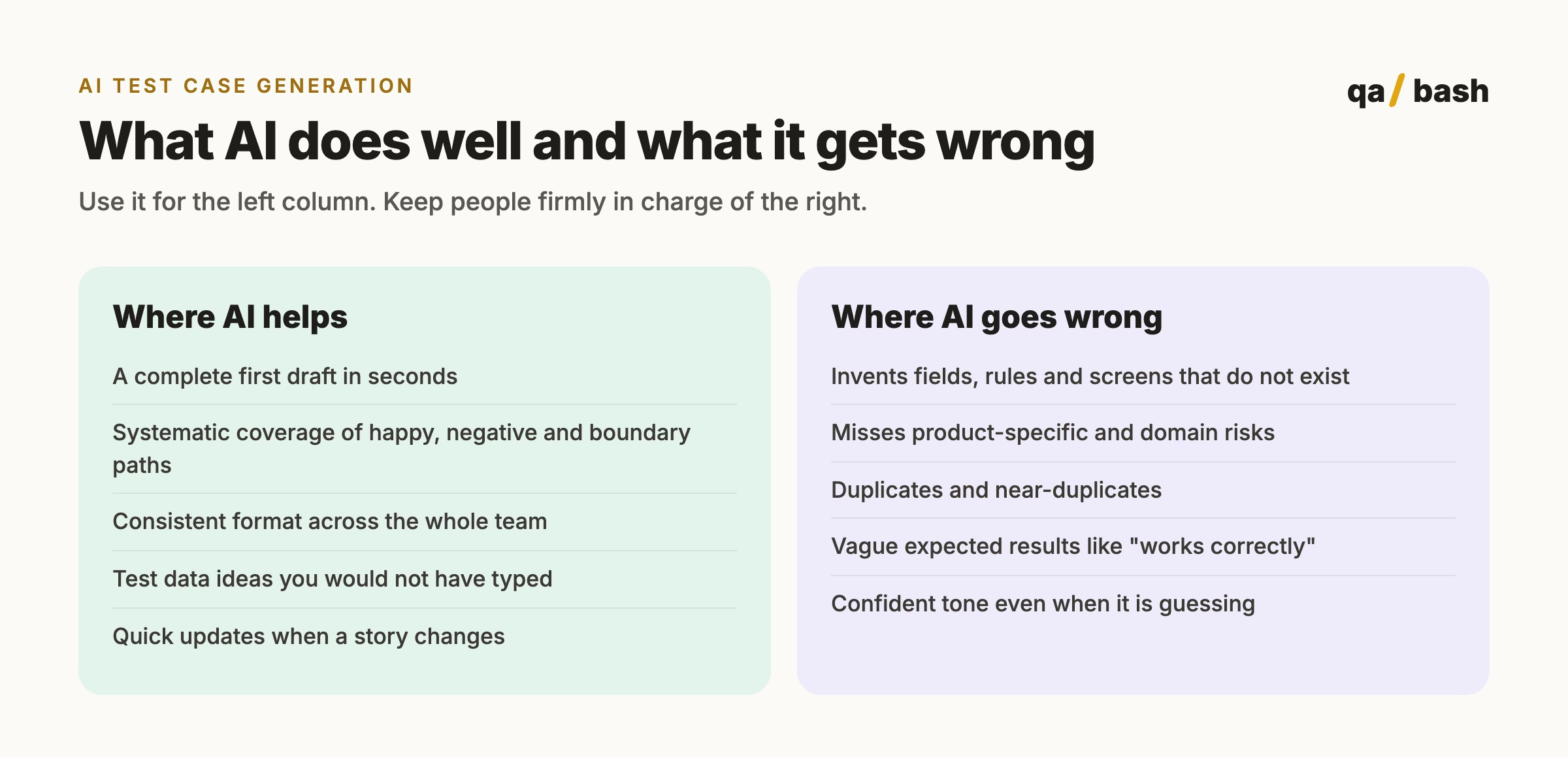
Give an AI a user story and thirty seconds later you have forty test cases. That part is real, and it is why AI test case generation went from a novelty to a default step in many QA teams in under two years. What the demos skip is the next hour: reading those forty cases, deleting the twelve that test nothing, fixing the eight that assume features you do not have, and adding the three edge cases the model never thought of.
I think AI test case generation is worth it. I also think most teams adopt it badly. This post covers what it does well, where it goes wrong, and the workflow I recommend so you get the speed without shipping the mistakes.
What is AI test case generation?
AI test case generation uses a language model to turn inputs such as user stories, acceptance criteria, API specs, UI screens or existing code into test cases: titles, preconditions, steps, test data and expected results. Some tools also produce automation code, for example Playwright or REST Assured tests, from the same input.
The output is a first draft. The model knows a lot about testing in general and nothing about your product, your users or last quarter’s production incident unless you tell it.
Benefits of AI test case generation
| Benefit | What it looks like in practice |
|---|---|
| Speed | A story’s first set of cases in under a minute instead of an hour |
| Coverage breadth | Negative, boundary and permission cases included by default |
| Consistency | Every case follows the same structure and naming |
| Lower blank-page cost | Reviewers edit a draft instead of starting from nothing |
| Faster maintenance | Regenerate and diff when acceptance criteria change |
Risks and how to handle them
| Risk | Why it happens | How to handle it |
|---|---|---|
| Hallucinated requirements | The model fills gaps with plausible guesses | Give it the full acceptance criteria and require it to flag assumptions |
| Shallow domain coverage | It knows generic testing, not your business | Add your domain rules, past defects and risk areas to the input |
| Volume over value | More cases look like more coverage | Deduplicate, then prioritise by risk before anything enters the suite |
| Weak expected results | Models default to vague outcomes | Reject any case without a specific, observable expected result |
| Data and privacy | Stories may contain customer or internal data | Strip sensitive data, or use tools with clear data handling terms |
| Over-trust | Fluent output reads as authoritative | Every generated case gets a named human reviewer |
A workflow for adopting AI test case generation
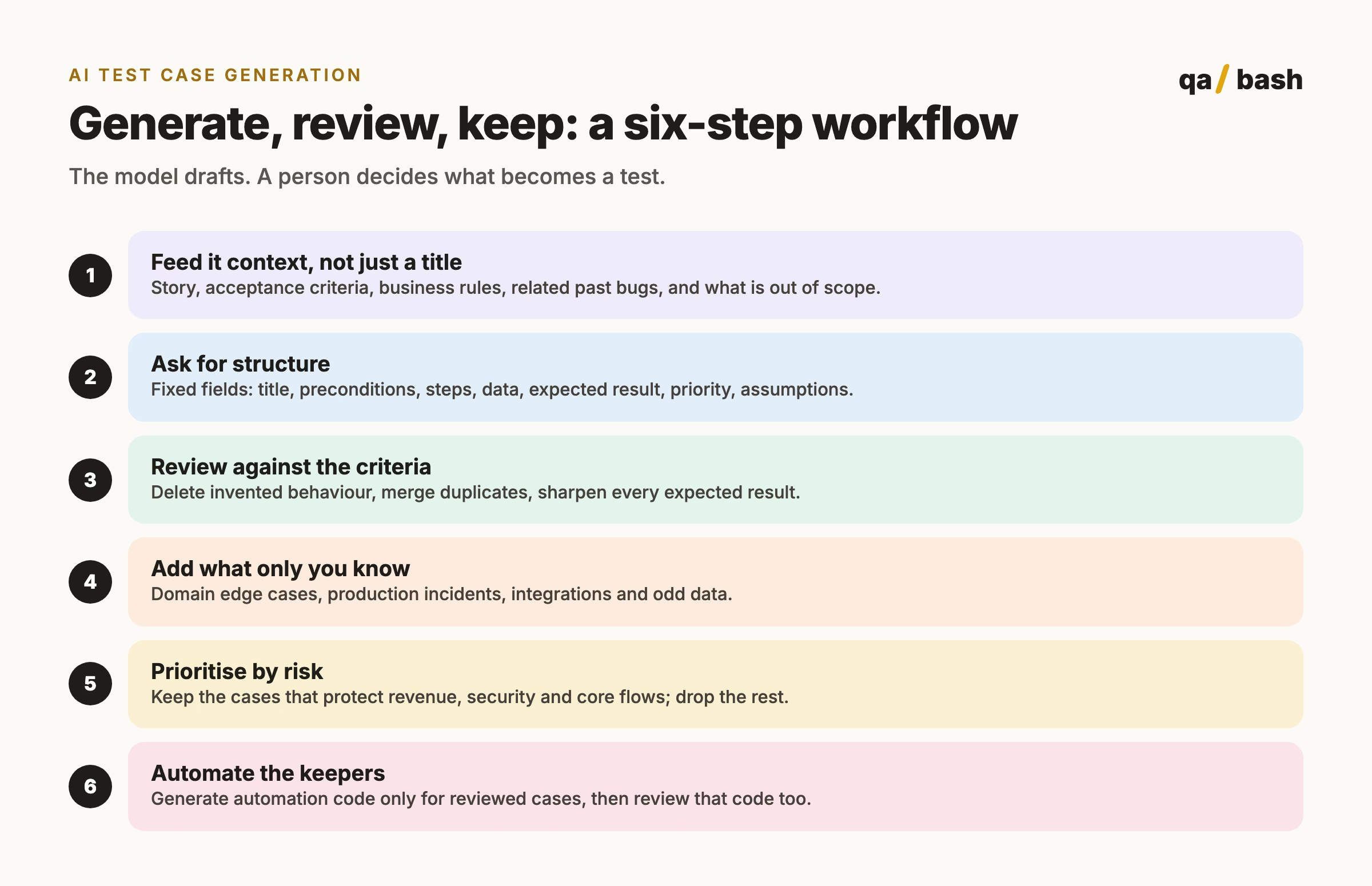
A prompt that produces reviewable test cases
You are a senior QA engineer. Write test cases for the user story below.

Rules:
- Use only behaviour stated in the story and acceptance criteria.
- If something is unclear, list it under "Assumptions" instead of guessing.
- Cover positive, negative, boundary and permission cases.
- Every expected result must be specific and observable.
- Output a table: ID | Title | Preconditions | Steps | Test data | Expected result | Priority

Story: <paste story>
Acceptance criteria: <paste criteria>
Business rules: <paste rules>
Known past defects in this area: <paste or "none">
The “Assumptions” list is the most useful part of the output. It shows exactly where the story is ambiguous, which is often a better review comment for the product owner than any test case.
How to measure whether it is working
- Acceptance rate: the share of generated cases that survive review. Below about half, your inputs are too thin.
- Review time per story: it should fall over the first few sprints, not rise.
- Defects found by generated cases versus hand-written ones, in the same features.
- Escaped defects in features designed mainly with AI. If they rise, review is too light.
Try it
You can try this workflow with our free AI Test Case Generator: paste a story and acceptance criteria and it returns structured functional, negative, boundary and security cases you can review and export. For more on reviewing what comes out, read writing test cases that hold up under review.
Rate this article
9.4/10 average · 33 ratings
Discussion
Start the conversation
What do you think about this article? Share your experience, ask a question, or add to the discussion.

qabash.comAmbassador
He’s a builder of communities, a collector of questions, and a relentless challenger of assumptions. While others chase answers, he chases better questions. While others talk about the future of testing, he quietly helps create it.
Frequently asked questions.
What is AI test case generation?
It is using a language model to turn user stories, acceptance criteria, specs or screens into test cases with steps, test data and expected results, and sometimes automation code.
Can AI replace manual test case design?
No. AI produces a fast first draft, but it does not know your product, users or past incidents. A tester still reviews, corrects, adds domain cases and decides what is worth keeping.
Related articles
When the AI Interviewer Meets the AI Candidate: What Are We Actually Hiring For?
What exactly are we measuring when AI becomes the gatekeeper between a candidate and a human being?
11 min
AI Agent Architectures for Test Automation: 6 Patterns QA Teams Should Know
This guide explains six AI agent architectures for test automation, from single agents to multi-agent…
5 min