Playwright MCP and Test Agents: A Practical Guide for Testers

qabash.comAmbassador
Nov 19, 2026
Quick answer
Playwright MCP is a Model Context Protocol server that lets AI agents (Claude Code, GitHub Copilot, Cursor and others) drive a real browser through Playwright, using structured accessibility snapshots instead of screenshots. Playwright test agents, set up with npx playwright init-agents, build on it with three roles: a planner that explores the app and writes a Markdown test plan, a generator that turns the plan into tests, and a healer that runs failing tests and fixes them. Treat their output like a junior engineer's pull request: useful, fast, and always reviewed.
Ask an AI assistant to “write a Playwright test for login” without giving it a browser, and it guesses. It invents selectors from what login pages usually look like, and you spend the afternoon fixing them.
Playwright MCP fixes the guessing. It gives the AI a real browser to look at and act in. Playwright’s test agents go further: a planner, a generator and a healer that explore your app, write tests and repair failing ones.
This guide shows how both work, how to set them up, and the one healer behaviour you must review before you trust a green build.
What is Playwright MCP?
MCP (Model Context Protocol) is an open standard for connecting AI applications to tools. An MCP server exposes actions, and an AI client calls them.
Playwright MCP is Microsoft’s MCP server for browser automation. It exposes tools such as navigate, click, type, take a snapshot and read network requests. When you ask your assistant “check whether the checkout button works for a guest user,” it actually opens the page and tries.
Why testers should care: the AI stops working from memory and starts working from evidence. Generated locators come from the real DOM, and bug reproduction steps come from a real session.
Why accessibility snapshots instead of screenshots?
By default, Playwright MCP describes the page to the model as an accessibility snapshot. That’s a structured tree of roles, names and states, for example button "Place order" or textbox "Email".
That design choice has three practical effects:
| Approach | Model sees | Cost | Reliability |
|---|---|---|---|
| Screenshot (vision) | Pixels | Higher, since images use more tokens | Model must guess what’s clickable |
| Accessibility snapshot | Roles, names, states | Lower for most pages | Elements are named the way users and screen readers see them |
There’s a bonus for testers: a page with poor accessibility gives the AI a poor snapshot. If the agent struggles to find your “Submit” button, a screen reader user probably struggles too. Agent confusion is a free accessibility smell test.
Snapshots don’t cover everything. Canvas apps, charts and visual-layout bugs still need screenshots or visual comparison.
How do you set up Playwright MCP?
You need Node.js 18 or newer.
Claude Code:
# Registers the Playwright MCP server with Claude Code
claude mcp add playwright npx @playwright/mcp@latest
Cursor, Claude Desktop and most other MCP clients, via their MCP config file (VS Code’s .vscode/mcp.json uses a servers key instead of mcpServers):
{
  "mcpServers": {
    "playwright": {
      "command": "npx",
      "args": ["@playwright/mcp@latest"]
    }
  }
}
Then ask in plain language: “Open https://demo.playwright.dev/todomvc, add two todos, complete one, and tell me what the counter shows.”
Pin the version in team setups.
@latestis fine on your laptop. In shared configs, pin an exact version so a server update doesn’t change agent behaviour under everyone at once.
What are Playwright test agents?
Playwright MCP is a general browser tool. Test agents are an opinionated workflow built on top of it, specifically for producing and maintaining a Playwright test suite.
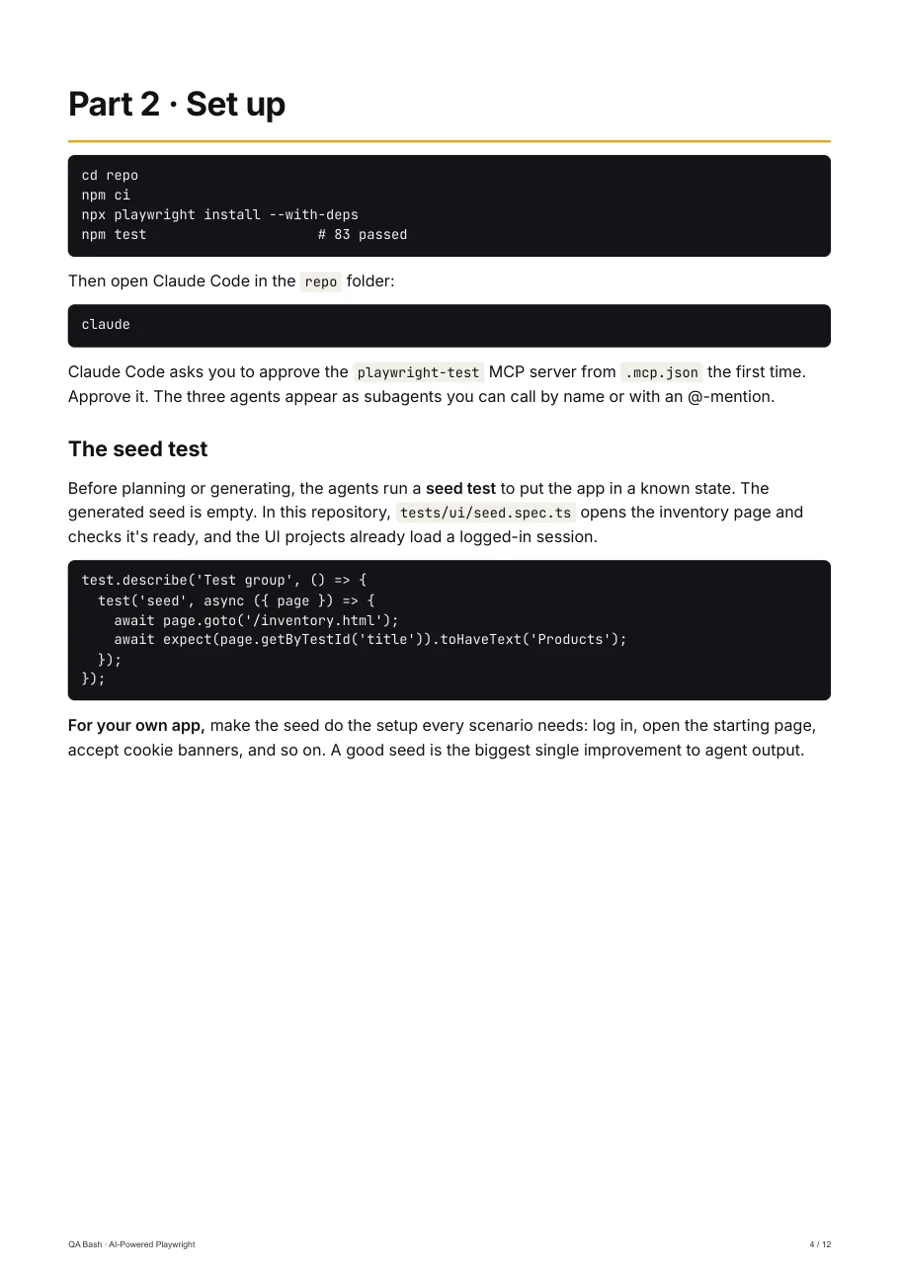
Initialize them in an existing Playwright project:
# Pick the agent loop you use: claude, codex, copilot, opencode or vscode
npx playwright init-agents --loop=claude
This writes agent definitions for your tool (for Claude Code, under .claude/agents/), an MCP config, and a seed test the agents start from. Commit these files, and re-run the command after upgrading Playwright so the definitions match the new version.
The three agents:
| Agent | Input | Output | What it’s good at |
|---|---|---|---|
| Planner | A goal plus your running app | A Markdown test plan in specs/ |
Exploring flows and listing scenarios, including edge cases you’d skip |
| Generator | The Markdown plan | Test files in tests/ |
Turning steps into code with locators checked against the live page |
| Healer | A failing test | A patched test, or a skipped one | Fixing drifted locators and timing issues |
Why a Markdown plan in the middle? It’s the most important design decision in the workflow. The plan is human-readable, so you review intent (“guest checkout with an expired card shows an error”) before any code exists. Reviewing ten lines of plan is faster and more effective than reviewing 200 lines of generated test.
How does the healer agent decide what to fix?
The healer runs the failing tests, pauses on the failure, inspects the page, and patches locators, waits or assertions until the test passes.
Here’s the detail that matters. Playwright’s own healer instructions tell it that if the error persists and it is confident the test is correct, it should mark the test test.fixme() with a comment. That skips the test instead of letting it fail.
That’s a reasonable choice for an automated agent, and it’s also exactly how a real bug can disappear from your pipeline:
- A developer breaks the “Apply coupon” button.
- The test fails.
- The healer can’t make it pass, decides the app is broken, and marks the test
fixme. - CI goes green. The bug ships.
The healer did nothing wrong. It flagged the problem in a comment. The failure is a process that merges healer output without a human reading it.
The same logic applies to every “fix.” A healer that changes expect(total).toHaveText('$90') to '$100' has made the test pass and may have just accepted a pricing bug. Locator fixes are usually safe. Assertion changes need a human every time.
The best testers don’t just find bugs. They uncover risks, including the risk that the tooling quietly hides one.
What does a good AI-generated test look like?
Hold generated tests to the same bar as hand-written ones. This is the shape to accept:
// tests/todo.spec.ts — the shape you should demand from an AI-generated test.
import { test, expect } from '@playwright/test';

test.describe('Todo list', () => {
  test.beforeEach(async ({ page }) => {
    await page.goto('https://demo.playwright.dev/todomvc/');
  });

  test('adds a todo and marks it complete', async ({ page }) => {
    const input = page.getByPlaceholder('What needs to be done?'); // user-facing locator, not CSS

    await input.fill('Write release notes');
    await input.press('Enter');

    const item = page.getByTestId('todo-item').filter({ hasText: 'Write release notes' });
    await expect(item).toBeVisible(); // web-first assertion: auto-waits, no sleeps

    await item.getByRole('checkbox').check();
    await expect(item).toHaveClass(/completed/);
    await expect(page.getByTestId('todo-count')).toHaveText('0 items left');
  });
});
Run it with npx playwright test. It passes against Playwright’s public demo app.
What makes it good: user-facing locators (getByPlaceholder, getByRole, getByTestId), web-first assertions that retry automatically, no hard sleeps, and an assertion on the outcome (the counter), not just the action. If any of these are new to you, read 10 Playwright features that replace traditional Selenium practices first.
How do you review AI-written tests in CI?
Agents generate tests faster than people can review them. So automate the obvious checks, and save human attention for intent and assertions.
This small Node script fails the build on common anti-patterns in agent output:
// review-gate.mjs — fail CI when AI-written tests contain known anti-patterns.
// Usage: node review-gate.mjs tests
import { readFileSync, readdirSync, statSync } from 'node:fs';
import { join } from 'node:path';

const RULES = [
  { re: /waitForTimeout\(/, why: 'hard sleep; use a web-first assertion instead' },
  { re: /\btest\.only\(/, why: 'focused test would skip the rest of the suite in CI' },
  { re: /locator\(['"`][^'"`]*(nth-child|:nth|\/\/div\[)/, why: 'brittle positional/XPath selector' },
  { re: /expect\(await\s/, why: 'non-retrying assertion; use expect(locator).toX()' },
  { re: /\{\s*force:\s*true\s*\}/, why: 'force:true hides real actionability bugs' },
  { re: /\btest\.fixme\(/, why: 'parked test; a human must confirm it is not a real bug' },
];

const walk = (dir) => readdirSync(dir).flatMap((f) => {
  const p = join(dir, f);
  return statSync(p).isDirectory() ? walk(p) : p.endsWith('.spec.ts') ? [p] : [];
});

let problems = 0;
for (const file of walk(process.argv[2] ?? 'tests')) {
  const src = readFileSync(file, 'utf8');
  src.split('\n').forEach((line, i) => {
    for (const { re, why } of RULES) {
      if (re.test(line)) { problems++; console.log(`${file}:${i + 1}  ${why}`); }
    }
  });
  if (!/expect\(/.test(src)) { problems++; console.log(`${file}  no assertions: it can only fail by crashing`); }
}
console.log(problems ? `\n${problems} problem(s) found` : 'review gate passed');
process.exit(problems ? 1 : 0);
Wire it in before the test run:
# .github/workflows/e2e.yml
name: e2e
on: pull_request
jobs:
  test:
    runs-on: ubuntu-latest
    steps:
      - uses: actions/checkout@v4
      - uses: actions/setup-node@v4
        with:
          node-version: 22
      - run: npm ci
      - run: node review-gate.mjs tests          # cheap static checks first
      - run: npx playwright install --with-deps chromium
      - run: npx playwright test
Why a regex script instead of an ESLint plugin? It has zero dependencies, takes seconds to read, and is trivial to extend with your team’s own rules. Graduate to eslint-plugin-playwright once the rule list grows. The test.fixme rule is deliberately strict: it forces a human to confirm each parked test.
Practical examples
Beginner: exploratory reproduction. Paste a bug report into your assistant with Playwright MCP enabled and ask it to reproduce the bug and list exact steps. You get a verified repro, or evidence that it doesn’t reproduce, in minutes.
Intermediate: plan-first coverage. Point the planner at one feature, such as password reset. Edit the Markdown plan by hand, removing noise and adding the risky cases only you know about. Then run the generator. You stay in charge of what is tested and the agent does the typing.
Advanced: healer as triage, not as fixer. Run the healer on nightly failures in a branch, never on main. Use its diff as a diagnosis: a locator change means UI drift, while a fixme or an assertion change means “a human looks at this today.”
Common mistakes testers make
| Mistake | Why it happens | Better approach |
|---|---|---|
| Auto-merging healer fixes | Green build feels like success | Healer output goes through a PR with human review |
| Skipping plan review | Wanting code immediately | Review the Markdown plan first, since that’s where intent lives |
| Accepting changed assertions | Diff looks small | Treat any expected-value change as a potential bug acceptance |
Using @latest in shared configs |
Copy-pasted from a README | Pin MCP and Playwright versions |
| Running agents against production | Convenient URL | Use test environments with test data; agents click everything |
| Generating 200 tests at once | It’s cheap to generate | Generate per feature; review cost is the real constraint |
| Ignoring agent confusion on a page | Blaming the AI | Check accessibility; unclear names hurt users too |
Interview questions
Beginner
1. What is Playwright MCP? An MCP server that lets AI agents control a browser through Playwright.
2. What is MCP? An open protocol for connecting AI clients to external tools and data.
3. What does the planner agent produce? A Markdown test plan describing scenarios and steps.
4. Why prefer getByRole over CSS selectors? It matches how users perceive the page and survives styling changes.
5. What’s a web-first assertion? An assertion that retries until the condition holds or times out, like expect(locator).toBeVisible().
Intermediate
1. Why does Playwright MCP use accessibility snapshots? They’re structured, cheaper than images, and name elements the way users do.
2. What’s the risk of the healer agent? It can make tests pass by changing assertions or parking tests with fixme, which can hide real bugs.
3. Why put a Markdown plan between exploring and generating? Humans review intent cheaply before any code exists.
4. How do you keep agent setups reproducible across a team? Pin versions and commit the agent definitions and config.
5. What should a CI gate check in AI-generated tests? Hard waits, focused tests, brittle selectors, missing assertions, force: true and fixme.
Advanced
1. How would you roll test agents out safely? Start with the planner only, add the generator per feature, and keep the healer in triage mode on a branch.
2. How do you tell a test bug from an app bug in healer output? Locator or wait changes suggest test drift. Assertion changes or fixme suggest the app may be broken.
3. Where do snapshots fall short? Canvas, visual layout and pixel-level bugs, which need visual testing.
4. How does agent output change code review? Volume rises, so automate mechanical checks and focus humans on assertions and intent.
5. What metrics show whether agents help? Time to a first reviewed test, the defect escape rate, and the share of healer changes that touch assertions.
How AI changes this
This topic is AI in testing, so the real question is what changes for the tester.
Writing test code becomes the cheap part. Deciding what to test and judging whether a passing test proves anything become the expensive parts, and they stay human. Models like Claude, GPT and Gemini, running inside Claude Code, Copilot or Cursor, will keep getting better at the typing. None of them knows that your “Apply coupon” flow lost the company money last quarter.
Expect the review gate to become the centre of your automation strategy. The teams that do well with agents will be the ones with the strictest review standards, not the ones generating the most tests.
Best practices checklist
- Playwright MCP and Playwright versions are pinned in shared configs
- Agents run against test environments, never production
- Planner output (Markdown) is reviewed before generation
- Generated tests use role/label/test-id locators and web-first assertions
- A CI review gate blocks sleeps,
.only, brittle selectors,forceandfixme - Healer changes go through a PR, never straight to
main - Any change to an expected value gets explicit human sign-off
- Agent definitions are regenerated after Playwright upgrades
- Pages that agents struggle with are reviewed for accessibility
Comparison table
| Feature | Playwright codegen | Playwright MCP | Playwright test agents |
|---|---|---|---|
| Who drives the browser | You (recording) | AI agent | AI agents (three roles) |
| Output | Raw test code | Whatever you ask for | Plan → tests → fixes |
| Explores on its own | No | When prompted | Yes (planner) |
| Fixes failing tests | No | When prompted | Yes (healer) |
| Determinism | High | Low | Low |
| Best for | Quick scaffolding | Repro, exploration, ad-hoc checks | Building and maintaining a suite |
| Review need | Medium | Medium | High |
Conclusion
Playwright MCP gives AI a real browser instead of a guess, and test agents turn that into a plan-generate-heal workflow. Used well, they remove the slowest part of automation, which is the typing.
Used carelessly, they create a suite that’s always green and proves nothing. The difference is a Markdown plan you actually read, a CI gate that catches the obvious, and a human who signs off on every changed assertion.
Set up MCP today, run the planner on one feature, and review the plan before generating a single test.
Automation can execute tests. Thinking still belongs to testers.
Keep testing. Keep learning. Keep questioning.
Go deeper · QA Bash kit
AI-Powered Playwright
Plan, generate and heal Playwright tests with Playwright's AI agents, and review them properly.
1–3 yrs · 83 passing tests
₹999₹1,249
Rate this article
9.3/10 average · 22 ratings
Discussion
Be the first to weigh in
Your question or experience helps the next tester who reads this. Sign in and earn +25 XP for every approved comment or reply.
Written by

Frequently asked questions.
What is Playwright MCP?
A Model Context Protocol server from Microsoft that lets AI agents control a real browser through Playwright.
Keep reading