Newsletter
One email. Every week. Pure signal.
The week in quality engineering — skip an issue, and you'll wish you hadn't.
20K+ engineers already reading
Jev Tutorial: From Your First Call to a QA Pipeline with Claude

Ishan Dev ShuklCommunity Council
Oct 3, 2026
Jev is TypeSafe AI's System One model. Instead of generating text, it takes state (a log, ticket or JSON) plus typed questions (Choice, Score or Noul) and returns typed answers with calibrated probabilities, in roughly 70 to 500 ms according to TypeSafe. To start, create an API key at console.typesafe.ai, install typesafe-sdk and call client.system_one(). Pair it with Claude by letting Jev make the routine decisions and sending only uncertain or high-value cases to Claude.
Every test pipeline I have worked on is full of small judgment calls. Is this failure a real regression or another flaky timeout? Which team owns this bug? Is this test case good enough to merge? We usually answer them in one of two ways: a pile of if statements that breaks the moment the error message changes, or a large language model that writes us a paragraph we then have to parse.
Jev is a third option, and it is the most interesting thing I have seen in AI tooling this year. It does not write text at all. You give it the situation and the possible answers, and it gives you back a decision with a probability attached. This Jev tutorial takes you from your first API call to a working QA pipeline where Jev makes the fast calls and Claude handles the ones that need real reasoning.
Everything here is based on TypeSafe’s own documentation and SDKs, plus independent write-ups I link along the way. Where a number comes from TypeSafe’s launch claims rather than independent testing, I say so.
What is Jev?
Jev is a TypeSafe AI model that makes structured decisions instead of generating text. TypeSafe calls it a System One model, borrowing the fast, intuitive “System 1” idea from psychology. Large language models like Claude play the slower, deliberate “System 2” role.
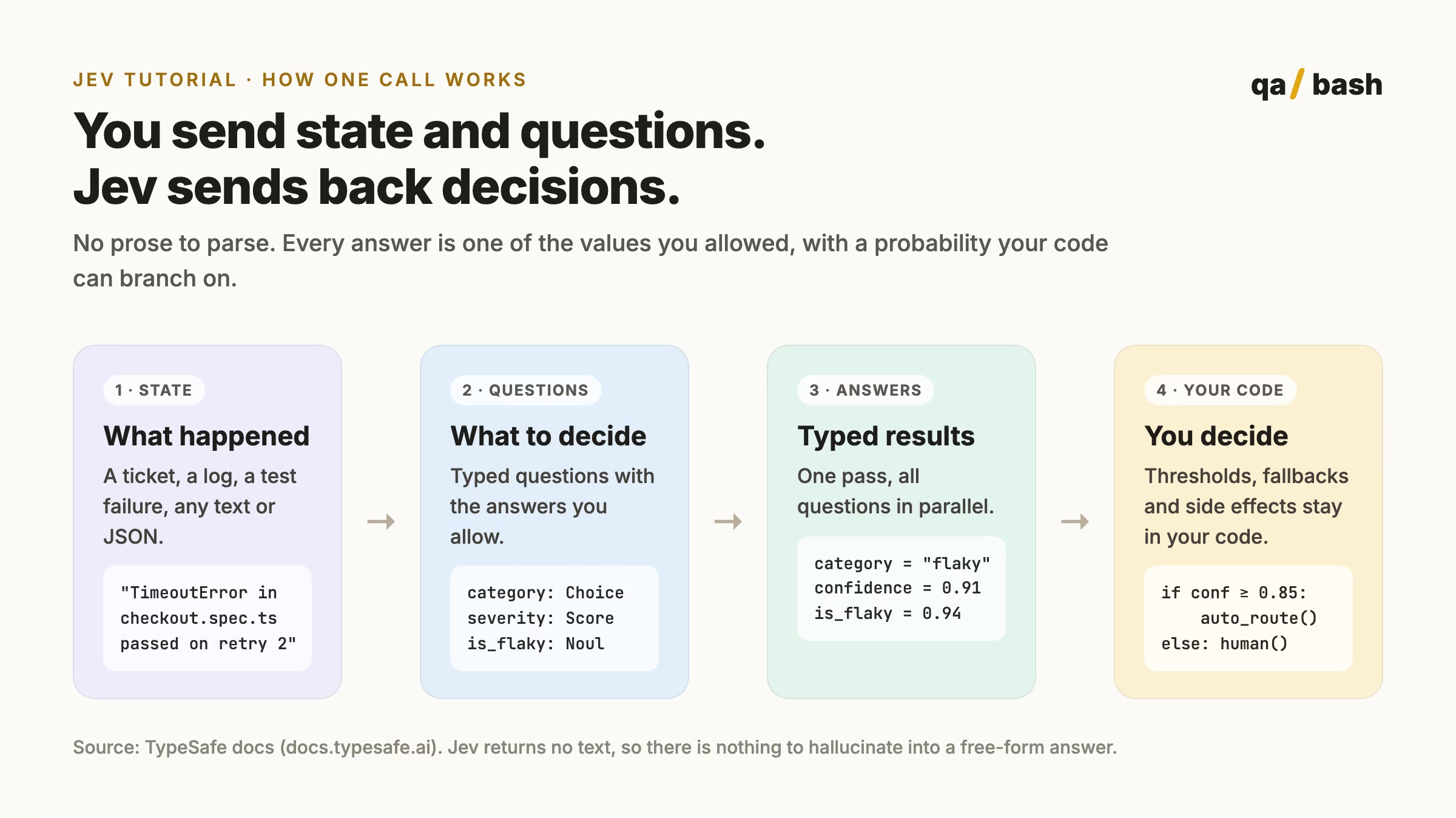
A call to Jev has two parts. The state is whatever you are deciding about: a log, a ticket, a JSON object. The questions are typed, and each one lists the answers it is allowed to return. Jev answers every question in one pass and returns typed values with probabilities. It can never return a category you did not define, because it never writes free text in the first place.
| Fact | Detail |
|---|---|
| Made by | TypeSafe AI, San Francisco, founded in 2024 by Diogo Almeida, Erik Gafni and Sasha Sheng |
| Released | 15 September 2026, in limited early access |
| What it returns | Typed answers (Choice, Score, Noul) with probabilities and confidence |
| What it does not do | Generate text, explain itself, do arithmetic |
| Speed (TypeSafe’s claim) | 70 to 500 milliseconds per call |
| Price at launch | $0.042 per million input tokens, output free |
| Official SDKs | Python (typesafe-sdk, 3.10+) and Node.js (@typesafe-ai/sdk, 20+) |
| Model names | jev-latest, jev-preview, pinned versions like jev-1.13.0 |
| Weights | Proprietary, no public weights or technical paper |
The name comes from the economist William Stanley Jevons and the Jevons paradox: when something gets much cheaper, people use far more of it. That is the bet here. If a decision costs a fraction of a cent and takes a few hundred milliseconds, you can afford to put one in places where calling an LLM never made sense. If you prefer video, our bash TV pick on what Jev is covers the basics in a few minutes.
Jev vs Claude: what each model is for
The fastest way to understand Jev is to compare it with a model you already use. Jev is not a smaller or worse Claude. It is built for a different job.
| Jev | Claude | |
|---|---|---|
| Output | Typed answers with probabilities | Text, code, structured output |
| Answer space | Fixed, defined by you | Open ended |
| Typical latency | Hundreds of milliseconds (TypeSafe’s figure) | Seconds for longer answers |
| Cost profile | Pay for input only | Pay for input and output |
| Explains its answer | No | Yes |
| Multi-step reasoning | No | Yes |
| Counting, dates, math | Unreliable | Much better, best with tools |
| Best QA uses | Triage, routing, gating, rubric scoring | Root cause analysis, bug reports, test design, code fixes |
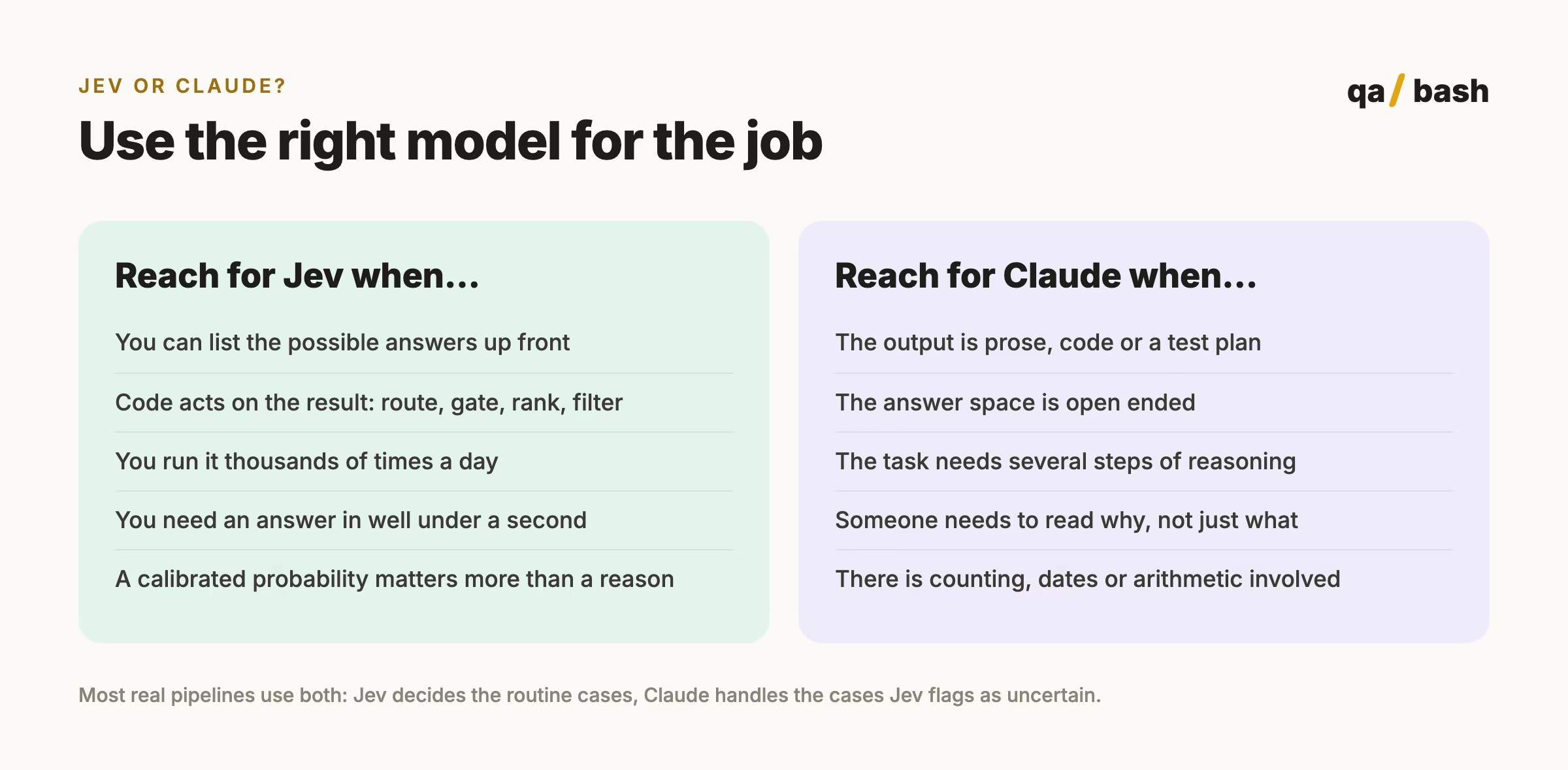
In practice you will want both. The pattern that keeps coming up in every serious write-up is a cascade: Jev handles every item, and only the uncertain or high-value cases go to Claude.
The three Jev question types
Every question you ask Jev is one of three types. Picking the right one is most of the skill.
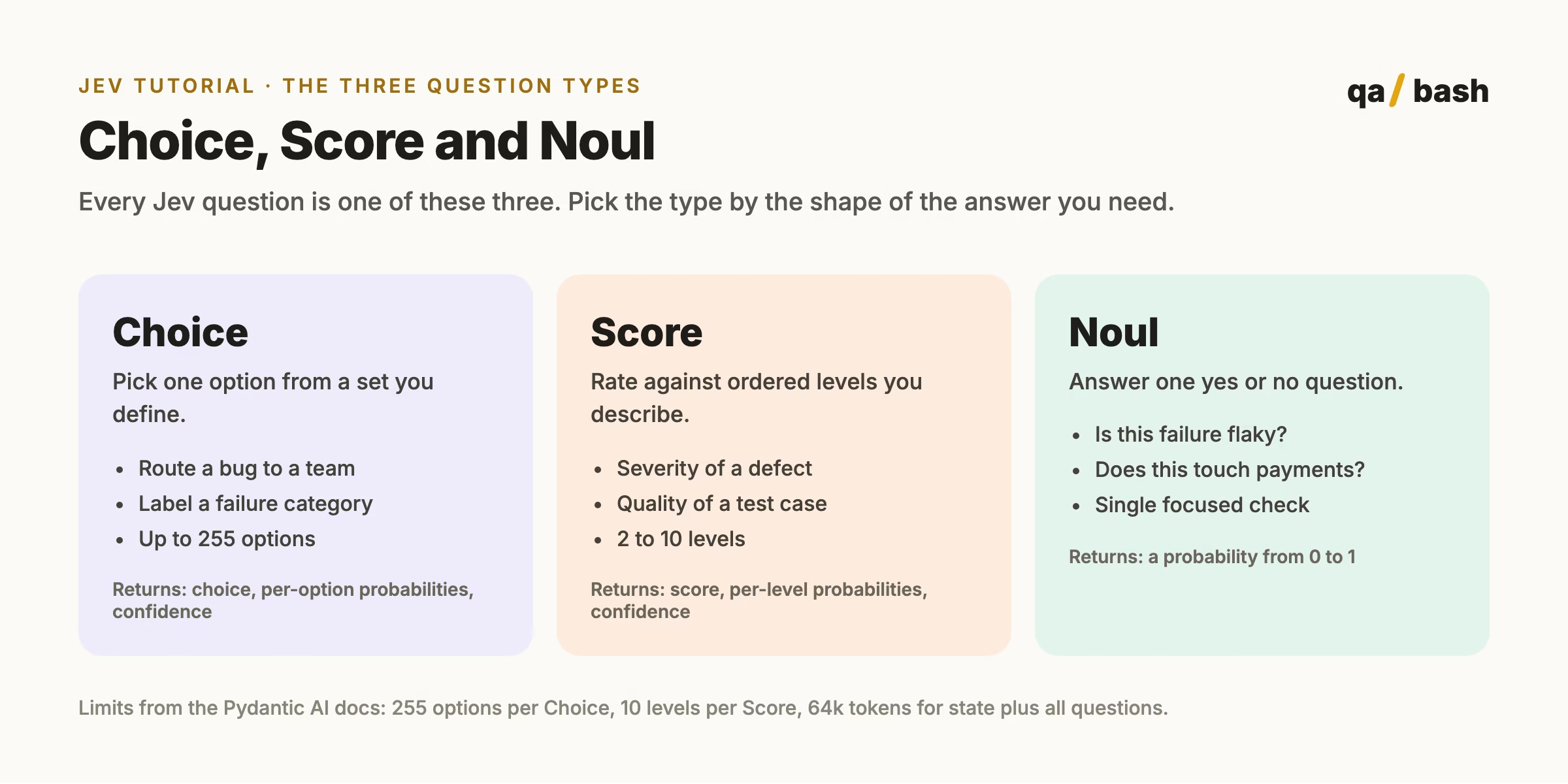
| Type | Use it when | QA example | What you get back |
|---|---|---|---|
| Choice | There is one right option out of a set | Is this failure a regression, flaky, environment, test data or unknown? | The chosen option, a probability for each option, a confidence value |
| Score | The answer sits on an ordered scale | How severe is this defect, from cosmetic to release blocking? | A score between levels, per-level probabilities, confidence |
| Noul | It is a single yes or no | Does this failure touch code changed in the pull request? | One probability between 0 and 1 |
A Noul has no separate confidence value, because the probability already tells you how sure Jev is. A Noul of 0.97 is a firm yes. A Noul of 0.52 is Jev shrugging.
Beginner: make your first Jev call in 5 steps
Step 1: Get an API key
Sign in to the TypeSafe console and create a key under API Keys. Access was rolled out as limited early access at launch, so if you do not see the option yet, join the waitlist there. Jev is also listed on OpenRouter and Vercel’s AI Gateway if you already use one of those.
export TYPESAFE_API_KEY="your-key-here"Step 2: Try it with curl
Before installing anything, send one request to the HTTP API so you can see the raw shape. This is the example from TypeSafe’s quickstart, asking a single yes or no question about a support message.
curl -X POST https://api.typesafe.ai/v1/systemone
  -H "Authorization: Bearer $TYPESAFE_API_KEY"
  -H "Content-Type: application/json"
  -d '{
    "state": "Hi, I have been trying to connect my Stripe account for 3 days and the integration keeps failing. I am losing sales. Please help ASAP.",
    "model": "jev-latest",
    "questions": {
      "urgency": {
        "type": "noul",
        "instructions": "Does this message express urgency?"
      }
    }
  }'
Step 3: Read the response
You get JSON back with the model version that answered, one entry per question, and token usage. No text to parse.
{
  "model": "jev-1.13.0",
  "answers": {
    "urgency": { "type": "noul", "noul": 1.0 }
  },
  "usage": { "input_tokens": 392, "output_tokens": 65 }
}
Step 4: Install the Python SDK
pip install typesafe-sdkOr uv add typesafe-sdk if you use uv. For JavaScript and TypeScript projects the package is @typesafe-ai/sdk.
Step 5: Ask your first QA question in Python
Here is the same idea applied to something every tester sees daily: a failing test.
from typesafe_sdk import Noul, TypeSafeClient

failure = (
    "checkout.spec.ts > applies coupon at payment stepn"
    "TimeoutError: locator('#pay-now') not visible after 30000msn"
    "Attempt 1: failed. Attempt 2: passed."
)

with TypeSafeClient() as client:
    response = client.system_one(
        state=failure,
        questions={
            "is_flaky": Noul(
                instructions="This failure looks timing related and passed on a retry",
            ),
        },
    )

print(response.model)
print(response.answers["is_flaky"].noul)
If that prints a model name and a number between 0 and 1, you are done with the basics.
Intermediate: ask several questions in one call
The real advantage shows up when you ask several questions about the same state. Jev answers all of them in parallel in a single request, so five questions cost about the same time as one. This is the shape I would start with for CI failure triage.
from typesafe_sdk import Choice, Noul, Score, TypeSafeClient

QUESTIONS = {
    "category": Choice(
        instructions="What most likely caused this test failure",
        criteria={
            "regression": "The product behaviour changed and the test caught it",
            "flaky": "Timing, ordering or retries; the same code can pass or fail",
            "environment": "Infrastructure: network, browser, runner, service down",
            "test_data": "Missing, stale or conflicting test data or accounts",
            "unknown": "The evidence does not support any of the above",
        },
    ),
    "severity": Score(
        instructions="How much this failure should block a release",
        criteria=[
            "Cosmetic, no user impact",
            "Minor, workaround exists",
            "Major, a core flow is degraded",
            "Release blocking, a core flow is broken",
        ],
    ),
    "touches_change": Noul(
        instructions="The failing code path is in the files changed by this pull request",
    ),
}

client = TypeSafeClient(model="jev-1.13.0")

def classify(failure: dict):
    r = client.system_one(state=failure, questions=QUESTIONS)
    cat = r.answers["category"]
    return {
        "category": cat.choice,
        "confidence": cat.confidence,
        "severity": r.answers["severity"].score,
        "touches_change": r.answers["touches_change"].noul,
        "model": r.model,
    }
Two details matter here. First, the unknown option. Independent testing listed in the community awesome-typesafe-jev guide found that when an “unknown” style option was available, Jev used it on ambiguous items, and when it was removed, accuracy on those items collapsed. Always give Jev a way out. Second, the state is a dict. Jev accepts plain text or JSON, so pass the structured failure record you already have.
Branch on confidence, not on the label
A label without a confidence is just a guess. The pattern that works is three paths, with thresholds you set from your own data:
| Confidence | What the pipeline does | Why |
|---|---|---|
| High (for example 0.85 and above) | Act automatically: label, route, open the ticket | Cheap mistakes are rare here and easy to undo |
| Middle band | Send to a person with Jev’s suggestion attached | The suggestion still saves time |
| Low | Fall back to the default path or escalate to Claude | Jev is telling you it does not know |
The numbers in that table are a starting point, not a recommendation. Collect 20 or more real failures with the answer you would have wanted, run Jev beside your current process without changing anything, and pick thresholds from what you see.
Pin the model version
jev-latest moves whenever TypeSafe ships a release. Once your thresholds depend on Jev’s behaviour, pin a version like jev-1.13.0 and log response.model on every call. If your routing suddenly drifts, the first thing to check is whether the model changed under you.
Advanced: pair Jev with Claude
This is where it gets useful for a QA team. Jev is fast and cheap but cannot explain anything. Claude can explain, write and reason, but you do not want to pay for a full Claude call on every red test in a 2,000 test suite. So each does what it is good at.
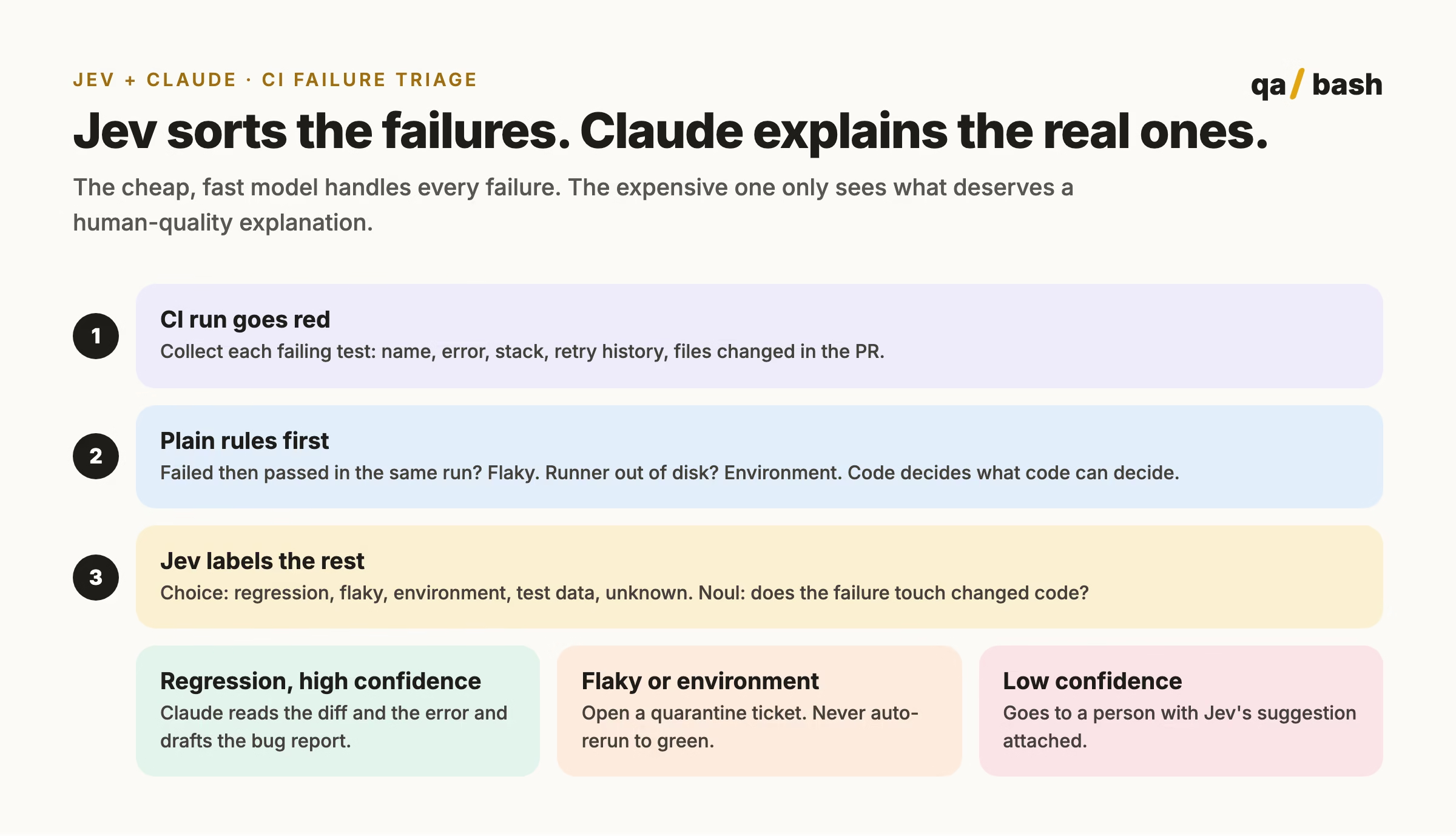
Pattern 1: Jev triages, Claude writes the bug report
Plain rules run first, because some failures need no AI at all. Jev labels what the rules cannot. Only confident regressions reach Claude, which reads the error and the diff and drafts a bug report a developer can act on.
import anthropic

claude = anthropic.Anthropic()

def rules_first(failure: dict) -> str | None:
    if failure.get("passed_on_retry"):
        return "flaky"
    if "No space left on device" in failure.get("error", ""):
        return "environment"
    return None

def triage(failure: dict) -> dict:
    label = rules_first(failure)
    if label:
        return {"category": label, "source": "rule"}

    result = classify(failure)  # the Jev call from the previous section
    if result["category"] == "regression" and result["confidence"] >= 0.85:
        msg = claude.messages.create(
            model="claude-sonnet-5-5",
            max_tokens=900,
            messages=[{
                "role": "user",
                "content": (
                    "A CI test failed and was classified as a regression.n"
                    f"Test: {failure['test']}n"
                    f"Error: {failure['error']}n"
                    f"Changed files: {', '.join(failure['changed_files'])}nn"
                    "Write a short bug report: summary, likely cause in the "
                    "changed files, steps to reproduce, and what to check first."
                ),
            }],
        )
        result["bug_report"] = msg.content[0].text
    elif result["confidence"] < 0.6:
        result["needs_human"] = True
    return result
Notice what this pipeline never does: it never reruns a test until it goes green and never hides a failure. Jev adds a label, code decides what happens, and anything uncertain goes to a person. If your team is fighting flaky tests right now, pair this with the fixes in our guide to common Playwright mistakes that cause flaky tests.
Pattern 2: use Jev from inside Claude Code
If you work in Claude Code, you do not have to write the integration yourself. TypeSafe ships an official agent skill:
claude plugin marketplace add typesafe-ai/skills
claude plugin install typesafe@typesafe-ai
With your TYPESAFE_API_KEY exported, you can then ask Claude Code to design Jev workflows for you, or call the skill directly with /typesafe:typesafe-ai. A prompt I would start with:
Use TypeSafe to classify the failing tests in the last CI run as regression, flaky, environment, test data or unknown. Send anything below 0.8 confidence to me for review and draft bug reports for the confident regressions.
There are also several community MCP servers that expose Jev as a tool to Claude Code and other agents. They are built by outside developers, not by TypeSafe or Anthropic, so read the code before giving one your API key. If MCP is new to you, start with our explainer on why MCP exists when we already had APIs.
Pattern 3: Jev as a pre-check on agent actions
When an AI agent is about to run a shell command or call an API, a quick Noul like “this action deletes or overwrites data” can catch risky steps before they run. It is fast enough to sit in front of every tool call.
Treat it as a signal, not a safety boundary. In a 111 case study of agent action gates listed in the same community guide, Jev matched 100 labels and Claude matched 102, and each allowed one unsafe action. High consequence actions like deleting data or touching production should be blocked by plain code rules no matter what any model says.
Where Jev gets it wrong
Every tool has edges. These are the ones documented by TypeSafe, the Pydantic AI docs and independent testers:
- No arithmetic, counting or dates. Jev reads dates as text and does not count reliably. Compute numbers in code and pass the result in the state.
- It answers the question you wrote. Instructions are read literally. Vague instructions give vague probabilities.
- State can be manipulated. If users write the text you pass in, they can try to steer the answer. Test with hostile inputs before you trust a gate.
- Thresholds do not transfer between question types. A Noul and a Choice asking the same thing can return different magnitudes.
- A Score between levels is not a measurement. 1.6 means “between level 1 and 2”, not a precise quantity.
- Hard limits. 255 options per Choice, 10 levels per Score, 32k tokens for state plus the longest question, 64k tokens for state plus all questions.
- No reasoning trace. There is nothing to read when it gets something wrong. Log the state and answers so you can review mistakes.
If you want to sharpen the instinct for which decisions belong to code, which to a fast model and which to a reasoning model, our AI Decision Framework post works through exactly that question.
What Jev costs
At launch TypeSafe priced Jev at $0.042 per million input tokens, with output free. Check the console for current pricing before you budget, since launch prices change.
| Scenario | Rough input | Cost at launch pricing |
|---|---|---|
| One CI failure with error, stack and changed files | About 1,000 tokens | $0.000042 |
| A busy day: 10,000 failures classified | About 10 million tokens | $0.42 |
| A month of that | About 300 million tokens | $12.60 |
The Claude calls in Pattern 1 will cost far more per call, which is exactly why they only run on the small slice of failures that deserve them.
A production checklist for QA teams
- Give every Choice an
unknownor “none of these” option. - Keep plain rules in front of Jev for anything code can decide.
- Label 20 or more real cases and run Jev in shadow mode before it changes anything.
- Set thresholds per question from that data, and keep a middle band for humans.
- Pin the model version and log
response.model, the state and every answer. - Never let a model auto-rerun, skip or hide a failing test.
- Hard-block destructive agent actions in code, whatever the model says.
- Review a sample of automated decisions every week for the first month.
Where to go next
Start small. Pick one judgment call your team makes dozens of times a day, write it as a Choice with an unknown option, and run it in shadow mode for a week. If you want practice diagnosing flaky failures yourself first, try the Flaky Triage game in the QABash Arena. And if you are building agents around Claude, our guide to context engineering for AI testing covers the other half of getting reliable answers: what you put in front of the model.
If you try Jev in your test pipeline, tell me what worked and what did not in the QABash community. Real results from real suites are worth more than any launch benchmark.
Rate this article
7.9/10 average · 25 ratings
Discussion
Start the conversation
What do you think about this article? Share your experience, ask a question, or add to the discussion.

Ishan Dev ShuklCommunity Council
With 15+ years in test automation, Ironman specializes in building scalable automation frameworks, AI-driven testing strategies, and modern quality engineering practices. He writes about automation tools, testing architecture, and the future of QA. His mission is simple: help testers evolve into engineers who build quality into every system.
Related articles
Claude Code Commands: 100 Worth Knowing and the 20 I Use Daily
This Claude Code commands guide lists 100 verified slash commands, CLI flags and shortcuts, and explains the…
10 min
The 10-Second Perfect Score: Trust, Testing & Curiosity
There’s a moment every tester knows well. Something looks fine on the surface, everyone else has moved on,…
8 min