Newsletter
One email. Every week. Pure signal.
The week in quality engineering — skip an issue, and you'll wish you hadn't.
20K+ engineers already reading
Claude Code Commands: 100 Worth Knowing and the 20 I Use Daily

Ishan Dev ShuklCommunity Council
Oct 3, 2026
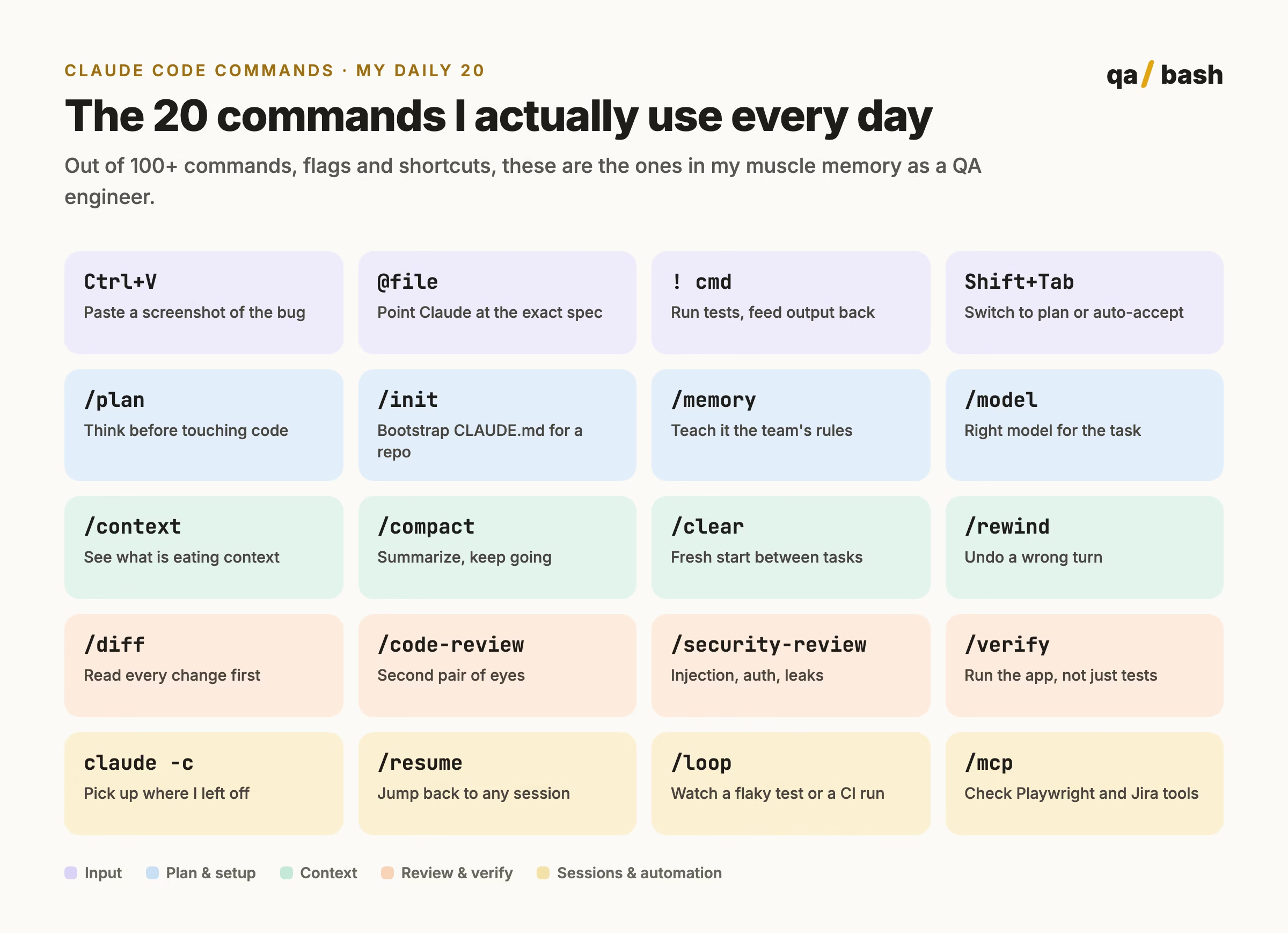
Claude Code has over 100 commands across slash commands like /plan, /compact and /code-review, terminal commands like claude -c and claude -p, and shortcuts like Shift+Tab and the ! and @ prefixes. The most useful daily set for QA work is: Ctrl+V for screenshots, @ file mentions, ! shell mode, Shift+Tab, /plan, /init, /memory, /model, /context, /compact, /clear, /rewind, /diff, /code-review, /security-review, /verify, claude -c, /resume, /loop and /mcp. Type / in a session to see what your version supports.
I counted. Claude Code now has well over a hundred commands, flags and shortcuts, and most lists online mix in commands that do not exist, like /commit or /pr, or ones Anthropic removed months ago. So I went through Anthropic’s official command, CLI and interactive mode references in October 2026 and put together the 100 that are actually worth knowing.
Then I did the more useful thing: I picked the 20 I use every single day as a QA engineer. If you only learn one part of this post, learn that part. The full list is there for when you need it.
A note before we start. Claude Code ships updates often, and some commands depend on your plan or platform. Type / in a session to see exactly what your version supports, and run /release-notes when something looks different.
The 20 Claude Code commands I use every day
These are ordered roughly by how often my fingers hit them. Each one comes with the QA reason it earned its place.
| # | Command | Why it is in my top 20 |
|---|---|---|
| 1 | Ctrl+V | Paste a screenshot of the bug straight into the prompt. Claude reads the image, and I can refer to it as [Image #1]. Half my bug reports start this way. |
| 2 | @path/to/file | Mention a file so Claude reads exactly the spec, page object or fixture I mean, instead of guessing from the folder name. |
| 3 | ! npx playwright test | Shell mode. The command runs, its output lands in the conversation, and Claude responds to the real failure, not my summary of it. |
| 4 | Shift+Tab | Cycles permission modes. I go to plan mode for anything risky and auto-accept edits for boring refactors of test data. |
| 5 | /plan | Plan mode straight from the prompt, for example /plan add API tests for the refunds endpoint. Claude reads and proposes before it edits. |
| 6 | /init | Creates a CLAUDE.md for a new repo. The first thing I run on any test framework I inherit. |
| 7 | /memory | Edits CLAUDE.md and auto memory. This is where rules like “never use waitForTimeout” live so I stop repeating them. |
| 8 | /model | Switches the model and saves it as default. A quick fixture change does not need the biggest model; a nasty race condition does. |
| 9 | /context | Shows a colored grid of what is filling the context window. When answers get vague, this usually tells me why. |
| 10 | /compact | Summarizes the conversation so far and frees context. I pass focus instructions like /compact keep the failing test names. |
| 11 | /clear | Starts a fresh conversation. I clear between unrelated tasks so a checkout bug does not leak into a login test. |
| 12 | /rewind | Rolls the conversation or the code back to an earlier point. My undo button when Claude goes down the wrong path. |
| 13 | /diff | Shows every change in the working tree, including Claude’s edits. I read this before anything gets committed. |
| 14 | /code-review | Reviews the current diff, a branch or a PR for correctness. Effort levels go from low to max, and ultra runs a deep cloud review. |
| 15 | /security-review | Checks the changes on my branch for injection, auth issues and data exposure. Cheap insurance before a release. |
| 16 | /verify | Builds and runs the app to confirm a change actually works, rather than trusting that the tests passed. |
| 17 | claude -c | Continues the most recent conversation in the current folder. My first command most mornings. |
| 18 | /resume | Opens the session picker, or resumes one by name. I name sessions with /rename so I can find them later. |
| 19 | /loop | Runs a prompt repeatedly, for example watching a CI run or rerunning a flaky spec until I understand the pattern. |
| 20 | /mcp | Manages MCP servers and their logins. I check here first when Playwright or Jira tools stop responding. |
If you are new to MCP, our explainer on why MCP exists when we already had APIs is a good primer before you connect Playwright or Jira.
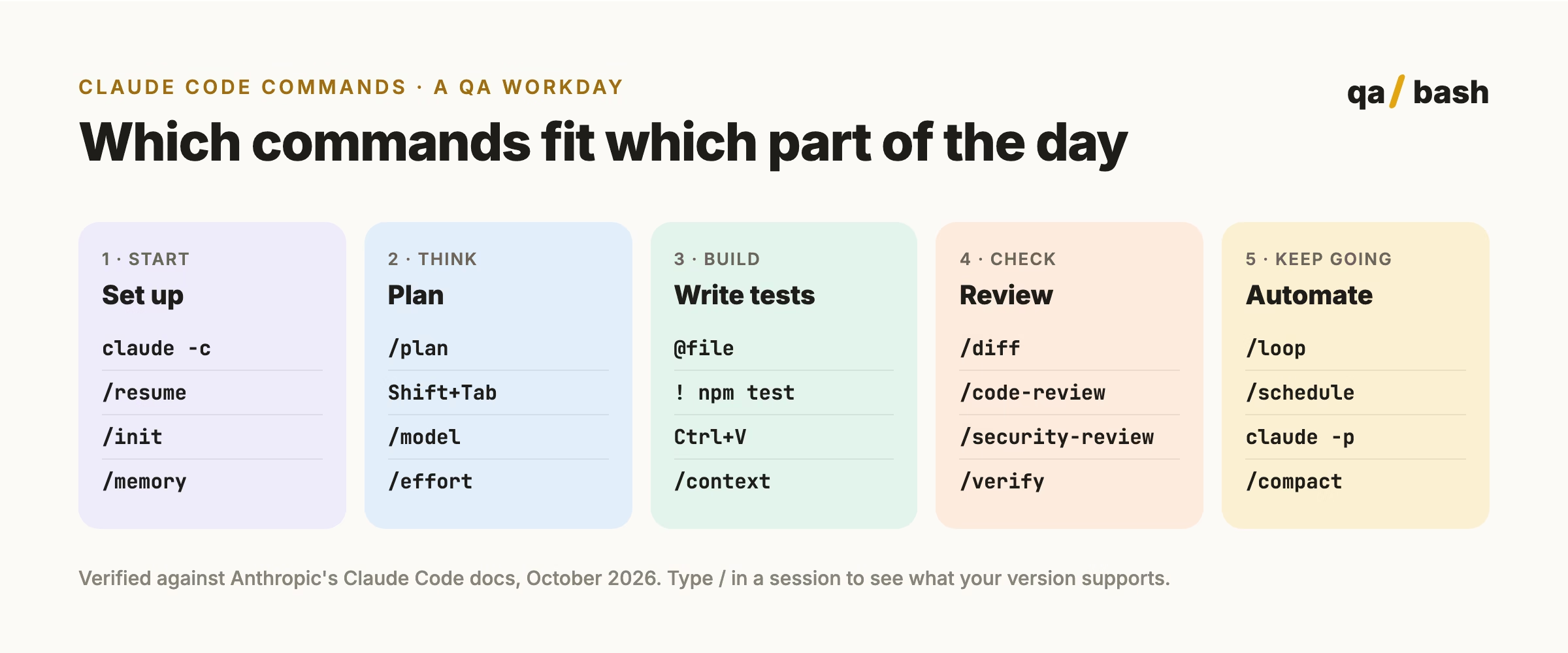
All 100 Claude Code commands, flags and shortcuts
Grouped by what you are trying to do. Slash commands run inside a session. CLI commands and flags run from your terminal. Shortcuts are keys you press in the prompt.
Session and context management
| # | Command | What it does | When I reach for it |
|---|---|---|---|
| 1 | /clear [name] | Starts a new conversation with empty context; the old one stays resumable | Switching to an unrelated task |
| 2 | /compact [instructions] | Summarizes the conversation to free context, with optional focus | Long debugging sessions |
| 3 | /context | Visualizes context usage as a grid with suggestions | Answers get vague or slow |
| 4 | /autocompact [auto|tokens] | Sets how full context gets before automatic compaction | Tuning very long sessions |
| 5 | /resume [session] | Resumes a conversation by ID or name, or opens the picker | Coming back to yesterday’s work |
| 6 | /rename [name] | Names the current session | Before a session you will want back |
| 7 | /rewind | Rewinds the conversation and/or code to a previous point (aliases /checkpoint, /undo) | Claude took a wrong turn |
| 8 | /branch [name] | Branches the conversation so you can try another direction | Comparing two fixes |
| 9 | /fork [prompt] | Copies the conversation into a new background session | Running a side investigation |
| 10 | /btw [question] | Asks a side question without adding it to the conversation | Quick lookups mid-task |
| 11 | /recap | Generates a one-line summary of the session | Status updates for standup |
| 12 | /export [filename] | Exports the conversation as plain text | Attaching an investigation to a ticket |
| 13 | /copy [N] | Copies the last (or Nth-latest) response, or a single code block | Grabbing a generated test |
| 14 | /focus | Shows only your prompt, a tool summary and the final answer | Reducing noise |
| 15 | /cd <path> | Moves the session to another directory, keeping the conversation | Jumping between repos |
| 16 | /add-dir <path> | Adds a working directory for file access | Tests live in a separate repo |
Models, effort and cost
| # | Command | What it does | When I reach for it |
|---|---|---|---|
| 17 | /model [model] | Switches the model and saves it as your default | Matching model to task difficulty |
| 18 | /effort [level] | Sets effort from low to max, or auto | Hard bugs versus quick edits |
| 19 | /fast [on|off] | Toggles fast mode | When speed matters more than depth |
| 20 | /advisor [model|off] | Enables a second model that advises at key moments | Tricky architecture decisions |
| 21 | /usage | Shows session cost, plan limits and activity (aliases /cost, /stats) | Checking spend |
| 22 | /output-style [style] | Lists or switches output styles, like concise | Shorter answers |
Planning, agents and automation
| # | Command | What it does | When I reach for it |
|---|---|---|---|
| 23 | /plan [description] | Enters plan mode, optionally with a task | Anything that touches many files |
| 24 | /goal [condition] | Keeps Claude working across turns until a condition is met | Get the suite green, with limits |
| 25 | /loop [interval] [prompt] | Runs a prompt repeatedly while the session is open | Watching CI or a flaky test |
| 26 | /schedule [description] | Creates or manages routines that run in the cloud | Nightly test health reports |
| 27 | /tasks | Views and manages background work (alias /bashes) | Checking long test runs |
| 28 | /subtask <task> | Spawns a forked subagent that inherits the conversation | Parallel investigation |
| 29 | /background [prompt] | Detaches the session to run as a background agent | Long refactors |
| 30 | /batch <instruction> | Splits a large change into parallel units after a plan | Migrating hundreds of tests |
| 31 | /workflows | Opens the workflow progress view | Watching multi-step runs |
| 32 | /deep-research <question> | Runs web searches and writes a cited report | Comparing test tools |
| 33 | /agents | Reminds you how to create and manage subagents | Setting up a test-writer agent |
| 34 | /list-agents | Lists subagents and sessions Claude can message | Coordinating parallel work |
Code review, testing and verification
| # | Command | What it does | When I reach for it |
|---|---|---|---|
| 35 | /diff | Reviews changes in the working tree, including Claude’s edits | Before every commit |
| 36 | /code-review [effort] [target] | Reviews the diff, a PR, branch or path for correctness (alias /review) | Pre-merge checks |
| 37 | /security-review | Analyzes branch changes for vulnerabilities | Before releases |
| 38 | /ultrareview [PR or branch] | Runs a deep multi-agent review in a cloud sandbox | High-risk PRs |
| 39 | /simplify [target] | Reviews changed code for cleanup and applies fixes | Tidying test helpers |
| 40 | /verify | Builds and runs your app to confirm a change works | Proving a fix, not just a green test |
| 41 | /run | Launches and drives your app to see a change working | Manual-style exploratory checks |
| 42 | /run-skill-generator | Teaches /run and /verify how to build your project | First-time setup |
| 43 | /debug [description] | Enables debug logging and reads the session log | Claude Code itself misbehaves |
| 44 | /autofix-pr [prompt] | A cloud session watches your PR and pushes fixes for CI failures and review comments | Keeping a PR green |
| 45 | /claude-in-chrome [task] | Has Claude act in your browser: test a page, fill a form, read console logs | Quick UI checks |
Project setup, memory and permissions
| # | Command | What it does | When I reach for it |
|---|---|---|---|
| 46 | /init | Creates a CLAUDE.md guide for the project | New repo |
| 47 | /memory | Edits CLAUDE.md files and auto memory | Recording team conventions |
| 48 | /permissions | Manages allow, ask and deny rules for tools | Locking down risky commands |
| 49 | /fewer-permission-prompts | Builds an allowlist of common read-only commands from your history | Too many prompts |
| 50 | /hooks | Views hook configurations | Auto-running lint after edits |
| 51 | /config | Opens settings, or sets key=value directly | Theme, model, editor mode |
| 52 | /update-config [request] | Describe a settings change and Claude edits settings.json | Adding an allowed command |
| 53 | /sandbox | Toggles sandbox mode where supported | Running untrusted scripts |
| 54 | /import [source] | Brings config from Codex, Gemini CLI or Cursor | Switching tools |
| 55 | /status | Shows version, model, account and connectivity | Support questions |
| 56 | /doctor | Runs a setup checkup that can fix issues | Something is broken |
| 57 | /login | Signs in to your Anthropic account | First run |
Skills, plugins, MCP and integrations
| # | Command | What it does | When I reach for it |
|---|---|---|---|
| 58 | /skills | Lists available skills, sortable by token cost | Seeing what is installed |
| 59 | /reload-skills | Rescans skill folders without restarting | After editing a skill |
| 60 | /skill-doctor | Shows each skill’s context cost and usage | Trimming unused skills |
| 61 | /plugin [subcommand] | Manages plugins: list, install, enable, disable | Adding team plugins |
| 62 | /reload-plugins | Reloads plugins to apply changes | After plugin edits |
| 63 | /mcp | Manages MCP servers and OAuth logins | Tool connection problems |
| 64 | /ide | Manages IDE integrations | VS Code or JetBrains setup |
| 65 | /chrome | Configures Claude in Chrome | Browser testing setup |
| 66 | /install-github-app | Installs the Claude GitHub App and optional Actions | PR automation |
| 67 | /claude-api | Loads Claude API reference and workflows like migrate and cost-optimize | Building on the API |
Interface, help and housekeeping
| # | Command | What it does | When I reach for it |
|---|---|---|---|
| 68 | /help | Shows help and available commands | Always |
| 69 | /release-notes | Shows the changelog by version | After an update |
| 70 | /insights | Generates an HTML report on how you use Claude Code | Monthly self-review |
| 71 | /team-onboarding | Generates an onboarding guide from your usage history | New teammate joins |
| 72 | /keybindings | Opens your keyboard shortcuts file | Custom keys |
| 73 | /statusline | Configures the status line | Showing branch and model |
| 74 | /theme | Changes the color theme, including colorblind themes | Readability |
| 75 | /terminal-setup | Installs Shift+Enter for newlines in supported terminals | Multiline prompts |
| 76 | /teleport | Pulls a cloud session into your terminal (alias /tp) | Continuing web work locally |
| 77 | /remote-control | Makes the session controllable from claude.ai | Checking in from your phone |
| 78 | /desktop | Continues the session in the Desktop app (alias /app) | Prefer a GUI |
| 79 | /feedback | Sends product feedback to Anthropic | Reporting an issue |
Terminal (CLI) commands and flags
| # | Command | What it does | When I reach for it |
|---|---|---|---|
| 80 | claude | Starts an interactive session | Every day |
| 81 | claude "query" | Starts a session with an initial prompt | Jumping straight in |
| 82 | claude -p "query" | Runs one query non-interactively and exits | Scripts and CI |
| 83 | cat log.txt | claude -p "explain" | Pipes content in | Explaining a failure log |
| 84 | claude -c | Continues the most recent conversation here | Picking up where you left off |
| 85 | claude -r "name" "query" | Resumes a session by ID or name | Returning to a named investigation |
| 86 | claude -w name | Starts in an isolated git worktree | Parallel work on one repo |
| 87 | claude --bg "task" | Starts a background agent and returns immediately | Fire and forget investigations |
| 88 | claude agents | Opens agent view to monitor background sessions | Managing parallel agents |
| 89 | claude --permission-mode plan | Starts in a chosen permission mode | Read-only exploration |
| 90 | claude --model sonnet | Sets the model for this session | Cheaper scripted runs |
| 91 | claude -p --output-format json "query" | Prints JSON output for scripts | Parsing results in CI |
| 92 | claude -p --max-turns 3 "query" | Limits agentic turns in print mode | Bounded CI jobs |
| 93 | claude update | Updates to the latest version | Weekly |
| 94 | claude doctor | Prints installation diagnostics without starting a session | Install problems |
| 95 | claude mcp | Configures MCP servers from the terminal | Scripting tool setup |
Keyboard shortcuts and prompt prefixes
| # | Command | What it does | When I reach for it |
|---|---|---|---|
| 96 | Shift+Tab | Cycles permission modes, including plan and auto-accept | Changing how much Claude can do |
| 97 | Esc | Interrupts Claude mid-response, keeping work done so far | Redirecting quickly |
| 98 | Esc Esc | Clears your draft, or opens rewind on an empty prompt | Undoing |
| 99 | ! (at start) | Shell mode: runs a command and adds its output | Running tests inline |
| 100 | @ (in prompt) | File path mention with autocomplete | Pointing at exact files |
That is 100. If you want to see how these fit into a real testing workflow, our post on context engineering for AI testing explains why /context, /memory and @ mentions matter so much for test quality.
Commands that no longer exist
Many cheat sheets still list these. Save yourself the confusion:
| Command | Status | Use instead |
|---|---|---|
/vim | Removed in v2.1.92 | /config, then Editor mode |
/pr-comments | Removed in v2.1.91 | Ask Claude to read the PR comments |
/ultraplan | Removed | Plan mode with /plan or Shift+Tab |
/commit, /pr | Never built in | Ask Claude to commit or open a PR, or write your own skill |
How to make your own commands
Built-in commands only go so far. Any repeated QA task, like “write API tests for this endpoint using our conventions”, can become your own command. In Claude Code these are skills: a folder with a SKILL.md file under .claude/skills/ in your repo, or ~/.claude/skills/ for yourself. Once it exists, you call it with /its-name, and /reload-skills picks up changes without a restart.
Three skills worth building for a QA team:
- /api-tests: generates API tests for a route following your folder layout, naming and assertion style.
- /bug-report: turns a failing test, screenshot and log into a ticket with steps to reproduce.
- /flaky-check: runs a spec several times, compares failures and labels the likely cause.
If you want a structured path from here, our Anthropic MCP course path for test engineers picks up where this post ends.
Start with five
Do not try to learn 100 commands. Learn these five this week: Shift+Tab, @, !, /compact and /diff. They change how you work more than the other 95 combined. Add one new command a week after that, and in a couple of months you will have your own top 20.
Tell me yours in the QABash community. I am always curious which commands other testers cannot live without.
Rate this article
8.6/10 average · 29 ratings
Discussion
Start the conversation
What do you think about this article? Share your experience, ask a question, or add to the discussion.

Ishan Dev ShuklCommunity Council
With 15+ years in test automation, Ironman specializes in building scalable automation frameworks, AI-driven testing strategies, and modern quality engineering practices. He writes about automation tools, testing architecture, and the future of QA. His mission is simple: help testers evolve into engineers who build quality into every system.
Related articles
Jev Tutorial: From Your First Call to a QA Pipeline with Claude
This Jev tutorial explains how TypeSafe’s decision model works, how to make your first API call, and how to…
13 min
Inside The AI Dictionary, an Interactive AI Encyclopaedia
The AI Dictionary is an interactive AI encyclopedia by Rahul Yadav that turns AI terms into a library you…
12 min